

 한국어
한국어 Tiếng Việt
 日本語
日本語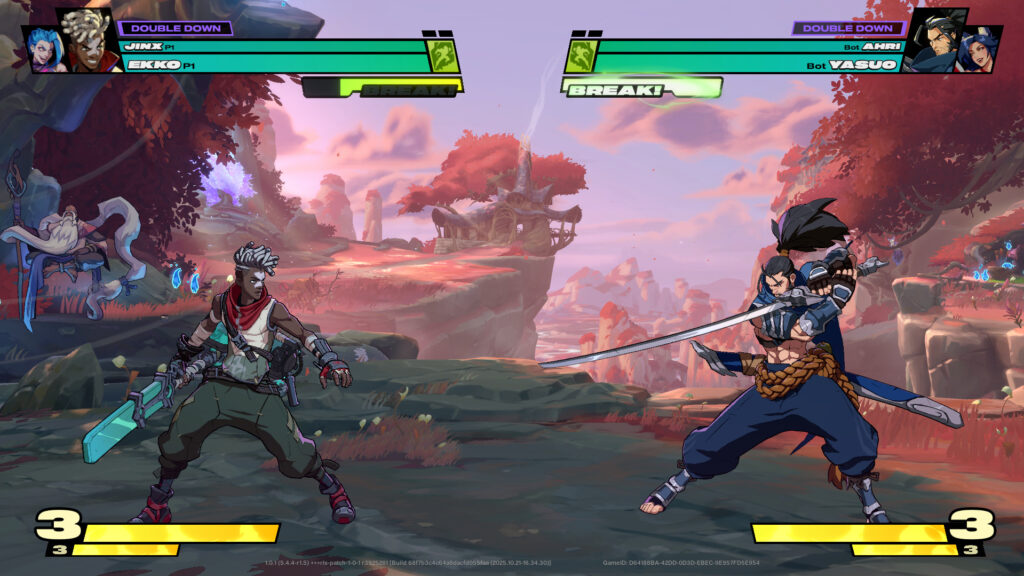
The Heads-Up Display (HUD) in 2XKO is the primary in-game interface that provides players with crucial information during matches. Positioned in front of the stage but behind the champion models, the HUD is designed to be intuitive and accessible. This guide will break down every element of the 2XKO HUD to help you understand and master the flow of combat.
Core Elements of the 2XKO HUD
Understanding the HUD is essential for competitive play. Here’s a detailed look at each component:
Champion Avatars:
Located at the top left and top right corners of the screen, the champion avatars display each team’s selected champions. Your team’s avatars will be in the corner corresponding to your starting side. The active champion is positioned below the assist champion, making it easy to track who is currently in the fight.
Health Bars:
The prominent horizontal bars next to the champion avatars represent the health of each active champion. These bars start as green and turn red as a champion takes damage within a combo. When a champion’s health is critically low, the bar will turn orange. The health bar for the assist champion is located directly above the active champion’s health bar.

Break Meter:
Situated beneath the health bars, the Break Meter is a key defensive resource. This meter builds slowly over time and fills faster when your champions take damage. Once full, you can activate the “Break” mechanic by pressing Tag Special 1 or Special 2 while being attacked to interrupt an opponent’s combo. Players begin each match with the Break Meter half-full, and its progress carries over between rounds.

Super Meter:
The Super Meter is located in the bottom corners of the screen, anchored to your starting position for the entire match. This meter is filled by performing actions in the game and is spent to unleash powerful Super moves.

Timer:
The timer is positioned at the top center of the HUD, clearly displaying the remaining time in seconds for the current match.

Hit Counter:
Appearing in the middle-left or middle-right of the screen, the hit counter tracks the number of consecutive hits in a combo. The counter is displayed under the team that is currently executing the combo.

System Text:
Various text prompts appear at the bottom corners of the HUD to signal specific in-game interactions and mechanics:
- Break Bonus!: Awarded for surviving a long combo, granting extra Break Meter.
- Handshake Tag!: Indicates a successful Handshake Tag.
- Hard Knockdown: Signals that a champion has been knocked down and will remain on the ground momentarily.
- Interrupt!: Appears when an attack is successfully interrupted.
- Punish!: Displays when you land an attack during your opponent’s recovery frames.
- Limit Strike: Occurs when a champion has used two “Major Hit Reactions” in a combo, which immediately ends it.
- Parry: Indicates a successful parry of an opponent’s attack.
- Tag Launcher!: Appears after successfully landing a Tag Launcher.
- Other Defensive Abilities: Text for actions like Retreating Guard or Push Assist will also be displayed upon activation.
By familiarizing yourself with these HUD elements, you can make more informed decisions, manage your resources effectively, and gain a competitive edge in 2XKO.