

 한국어
한국어 Tiếng Việt
 日本語
日本語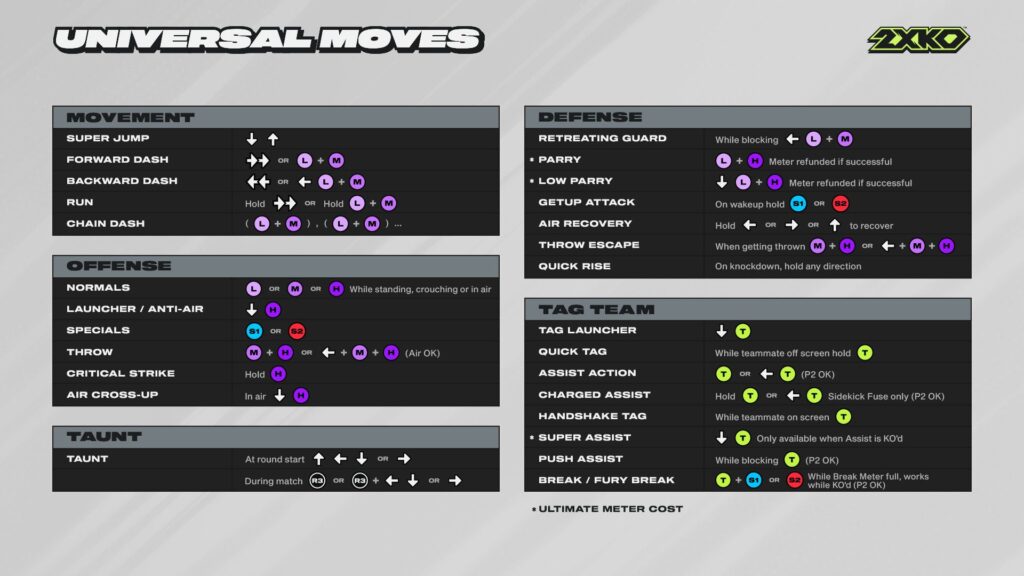
Welcome to the ultimate guide for mastering the controls in 2XKO. Whether you’re playing on a gamepad, keyboard, all-button controller, or a traditional fight stick, understanding the core inputs is your first step toward victory. This article breaks down the essential button layout, explains common fighting game notation, and provides a complete list of universal moves.
Supported Input Devices
2XKO is designed to be accessible and can be played on a wide range of devices to suit your playstyle:
- Gamepads: Standard controllers like those for PlayStation or Xbox.
- Keyboard: The classic choice for PC gamers.
- All-Button Controllers: Also known as “leverless” controllers, offering precise directional inputs.
- Universal Controllers: Commonly called “fight sticks” or “arcade sticks,” providing an authentic arcade experience.
The Core Button Layout
Every controller uses a set of primary actions. Here are the fundamental buttons you’ll need to master:
- Directional Inputs: Four directional keys (
 ,
,  ,
,  ,
,  ) or a joystick.
 - Light: Light Attack (
 )
) - Medium: Medium Attack (
 )
) - Heavy: Heavy Attack (
 )
) - Special 1: Special Move 1 (
 )
) - Special 2: Special Move 2 (
 )
) - Tag: Used for all team-based mechanics (
 ).
). - Forward Dash: A dedicated button for dashing (
 ).
). - Parry: A dedicated button for defensive parries (
 ).
).
Understanding Numpad Notation
In the fighting game community, directional inputs are often described using numpad notation. This system relates directions to the numbers on a keyboard’s numpad, making it a universal language for combos and moves.
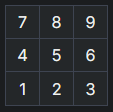
- 5 represents the neutral position (no direction held).
- 2 represents Down.
- 6 represents Forward.
- j. is often used as a prefix for an aerial or jumping move.
For example, a common move notated as 2S1 means you should press Down + Special 1 ( + ). A move written as j.H means you perform a Heavy Attack while in the air.
2XKO Universal Moves Breakdown
Every champion in 2XKO shares a set of universal moves. While the animation and properties may differ slightly between characters, the input commands remain the same.
Movement
| Move | Buttons |
| Super Jump | |
| Forward Dash | OR + |
| Backwards Dash |  OR + OR + |
| Run | Hold OR Hold + |
| Chain Dash | + , + |
Offense
| Move | Buttons |
| Normals | OR OR (can be done standing, crouching, or in the air) |
| Launcher/Anti-Air | + |
| Specials | OR |
| Throw | + OR + + (can be done in the air) |
| Critical Strike | Hold |
| Air Cross-Up | While in the air, + |
Taunt
| Move | Buttons |
| Round Start Taunt | , , OR |
| Mid-Game Taunt | Taunt |
Defense
| Move | Buttons |
| Retreating Guard | While blocking, + + |
| Parry | + (Uses 1 Super Meter, refunded if successful) |
| Low Parry | + + (Uses 1 Super Meter, refunded if successful) |
| Getup Attack | On wakeup, Hold OR |
| Air Recovery | After being hit in the air, Hold , , or |
| Throw Escape | When being thrown, + OR + + |
| Quick Rise | On knockdown, Hold any direction |
Team Mechanics
| Move | Buttons |
| Tag Launcher | + |
| Quick Tag | While teammate is off-screen, Hold |
| Assist Action | OR + |
| Charged Assist | Hold OR + (Sidekick fuse only) |
| Handshake Tag | While teammate is on-screen, |
| Super Assist | + (Only when Assist is KO’d) |
| Push Assist | While blocking, |
| Break/Fury Break | + OR (when Break Meter is full) |